Valiant Operations Intelligence
Internal intelligence and operations platformAn internal platform for Valiant Entertainment that brings email campaign performance, audience sentiment, and MNDA agreement workflows into one sign-in, running in production.
- My role
- Built the platform: the Next.js application, the email, social, and post intelligence views, the MNDA send-and-track workflow, and access administration.
- Built with
- Next.js, GoHighLevel, Google Sheets, Resend, Vercel
- Status
- Private production system, sign-in only
- 3 areasintelligence, agreements, and administration in one app
- Sourced viewseach intelligence view names the data source behind it
- In productiona private system; the walkthrough is the demo
Before
The problem
Audience intelligence, campaign reporting, and agreement workflows were spread across different tools and manual processes.
The platform
What the system does
Intelligence
What the audience is doing and saying.
- Email IntelligenceCampaign delivery and engagement rates, what changed since the latest send, and the trend across platforms.
- Social IntelligenceFan mentions by sentiment, the most discussed characters and topics, and an AI summary.
- Post PerformanceComment sentiment on official posts, with the most positive and most negative post pulled out.
Agreements
MNDAs sent and tracked in one place.
- Send MNDASend a signing link to an individual collaborator or vendor.
- MNDA TrackingEvery link's status, signed, expired, or superseded, with the signed file.
Administration
Who gets in, and who gets told.
- Access ManagementReview requests, grant access directly, set roles, and revoke.
- Notification RecipientsManage who receives signature notifications.
Product walkthrough
Five screens from the production system
It's a private, sign-in-only platform, so there is no public demo to link to. These are sanitized screenshots of the real thing, in the order the sidebar lists them.
Email Intelligence
Campaign performance, with its caveats on screen
Delivered volume and click, open, unsubscribe, and bounce rates across every campaign, each with a per-campaign sparkline. What Changed compares the latest send with the campaign median, and the trend chart breaks where campaigns moved platforms instead of blending two sources into one line.
› Open rates are flagged where Apple Mail privacy inflates them, and overall rates are weighted by volume.
- Email Intelligence: Campaign performance, with its caveats on screen. Delivered volume and click, open, unsubscribe, and bounce rates across every campaign, each with a per-campaign sparkline. What Changed compares the latest send with the campaign median, and the trend chart breaks where campaigns moved platforms instead of blending two sources into one line. Open rates are flagged where Apple Mail privacy inflates them, and overall rates are weighted by volume.
- Social Intelligence: What fans are saying, sorted by sentiment. Fan mentions are deduplicated and counted by sentiment, then ranked by the characters and topics people discuss most. An AI summary sits on top: what fans are excited about, and the concerns worth watching. Sentiment labels come from the upstream collection pipeline, and the counts the summary cites are verified server-side.
- Post Performance: How the audience responds to official posts. Comment sentiment for every official post, with the most positive and most negative post pulled out above the per-post chart. Duplicate and empty comment rows are removed before anything is counted.
- MNDA Tracking: Every agreement, and where it stands. MNDA signing links go out from the dashboard to individual collaborators or vendors. Tracking lists every link sent with its recipient, sender, send date, and current status, plus the signed file once it comes back. Expired and Superseded are worked out from each link's expiry and any later resend.
- Access Management: Who can see it, and who hears about it. Admins review access requests, grant access directly, set each person's role, and revoke it. Signature notification recipients are managed in the same Administration section. People without access request it from the sign-in screen, which offers password or Google sign-in.
Email Intelligence
Campaign performance, with its caveats on screen
Delivered volume and click, open, unsubscribe, and bounce rates across every campaign, each with a per-campaign sparkline. What Changed compares the latest send with the campaign median, and the trend chart breaks where campaigns moved platforms instead of blending two sources into one line.
› Open rates are flagged where Apple Mail privacy inflates them, and overall rates are weighted by volume.
Real buildIntelligence / EmailFull size ↗ 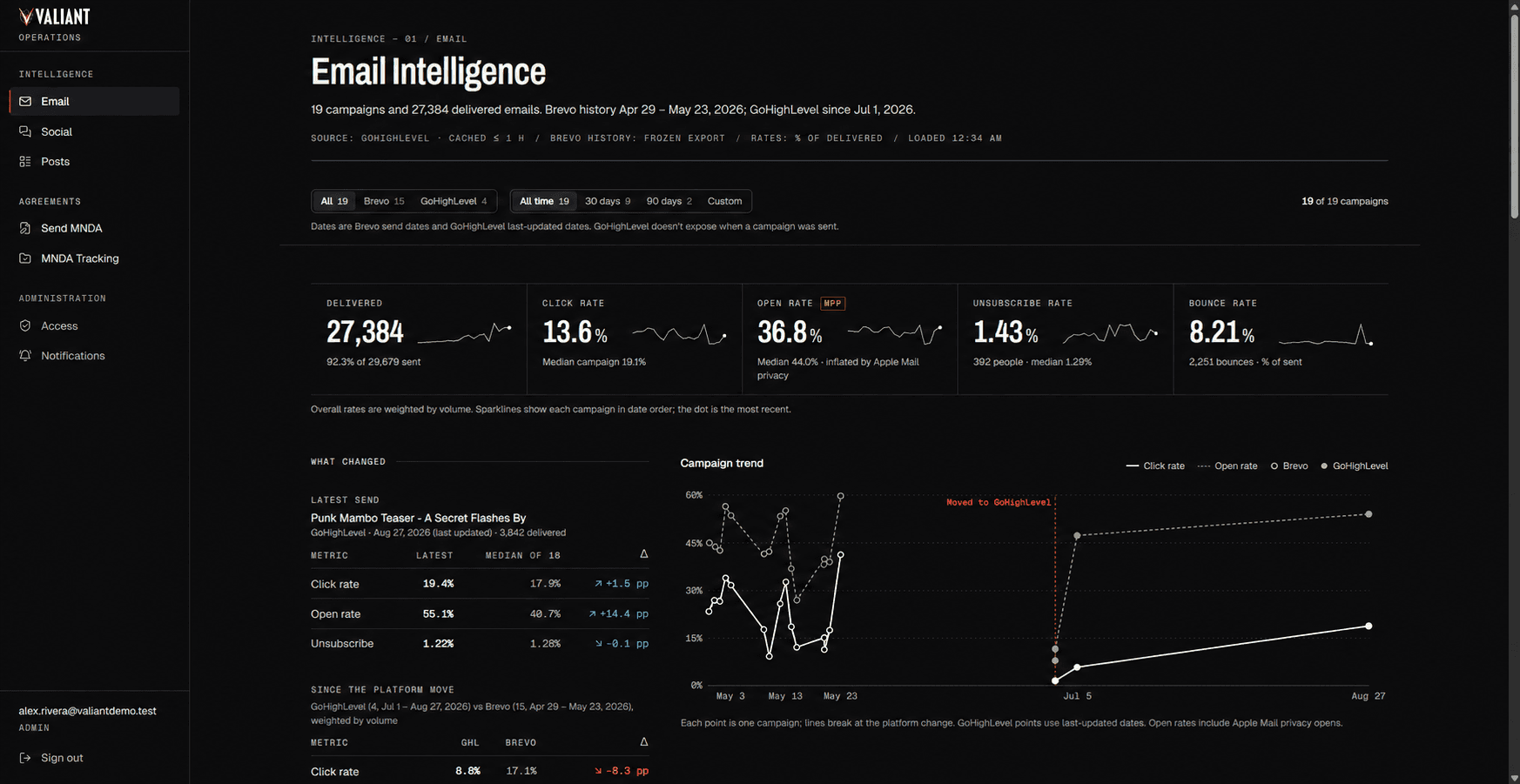
Social Intelligence
What fans are saying, sorted by sentiment
Fan mentions are deduplicated and counted by sentiment, then ranked by the characters and topics people discuss most. An AI summary sits on top: what fans are excited about, and the concerns worth watching.
› Sentiment labels come from the upstream collection pipeline, and the counts the summary cites are verified server-side.
Real buildIntelligence / SocialFull size ↗ 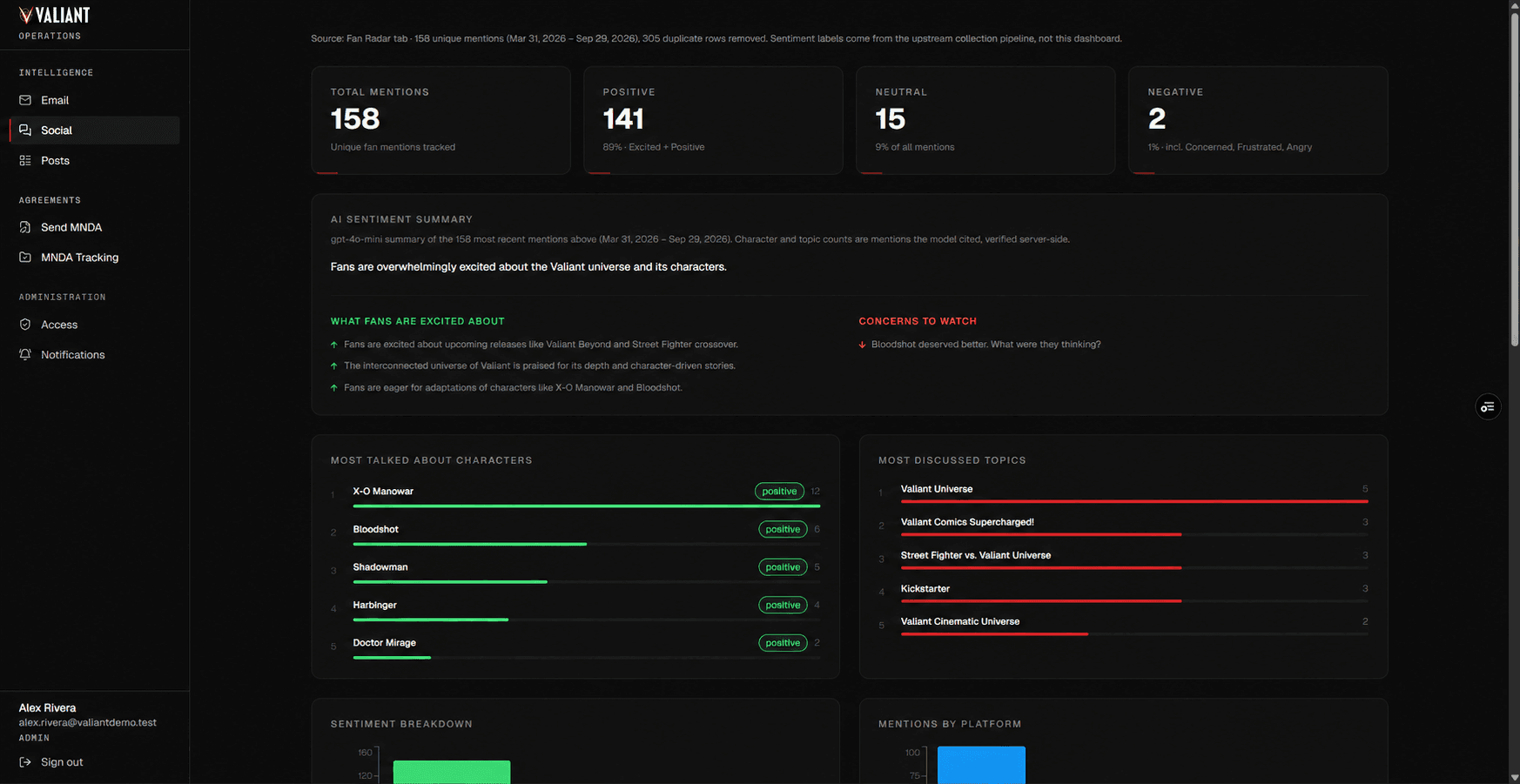
Post Performance
How the audience responds to official posts
Comment sentiment for every official post, with the most positive and most negative post pulled out above the per-post chart.
› Duplicate and empty comment rows are removed before anything is counted.
Real buildIntelligence / PostsFull size ↗ 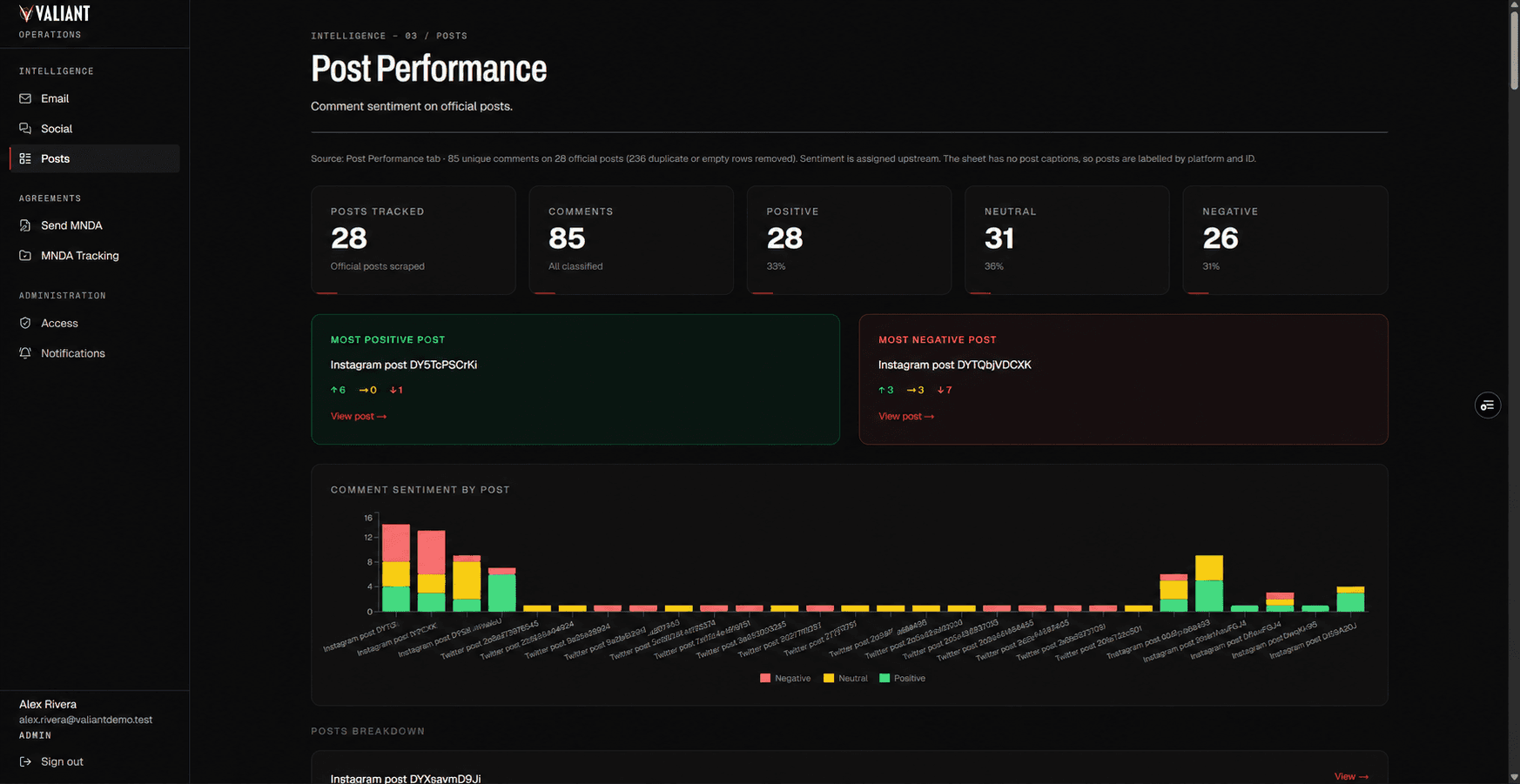
MNDA Tracking
Every agreement, and where it stands
MNDA signing links go out from the dashboard to individual collaborators or vendors. Tracking lists every link sent with its recipient, sender, send date, and current status, plus the signed file once it comes back.
› Expired and Superseded are worked out from each link's expiry and any later resend.
Real buildAgreements / MNDA TrackingFull size ↗ 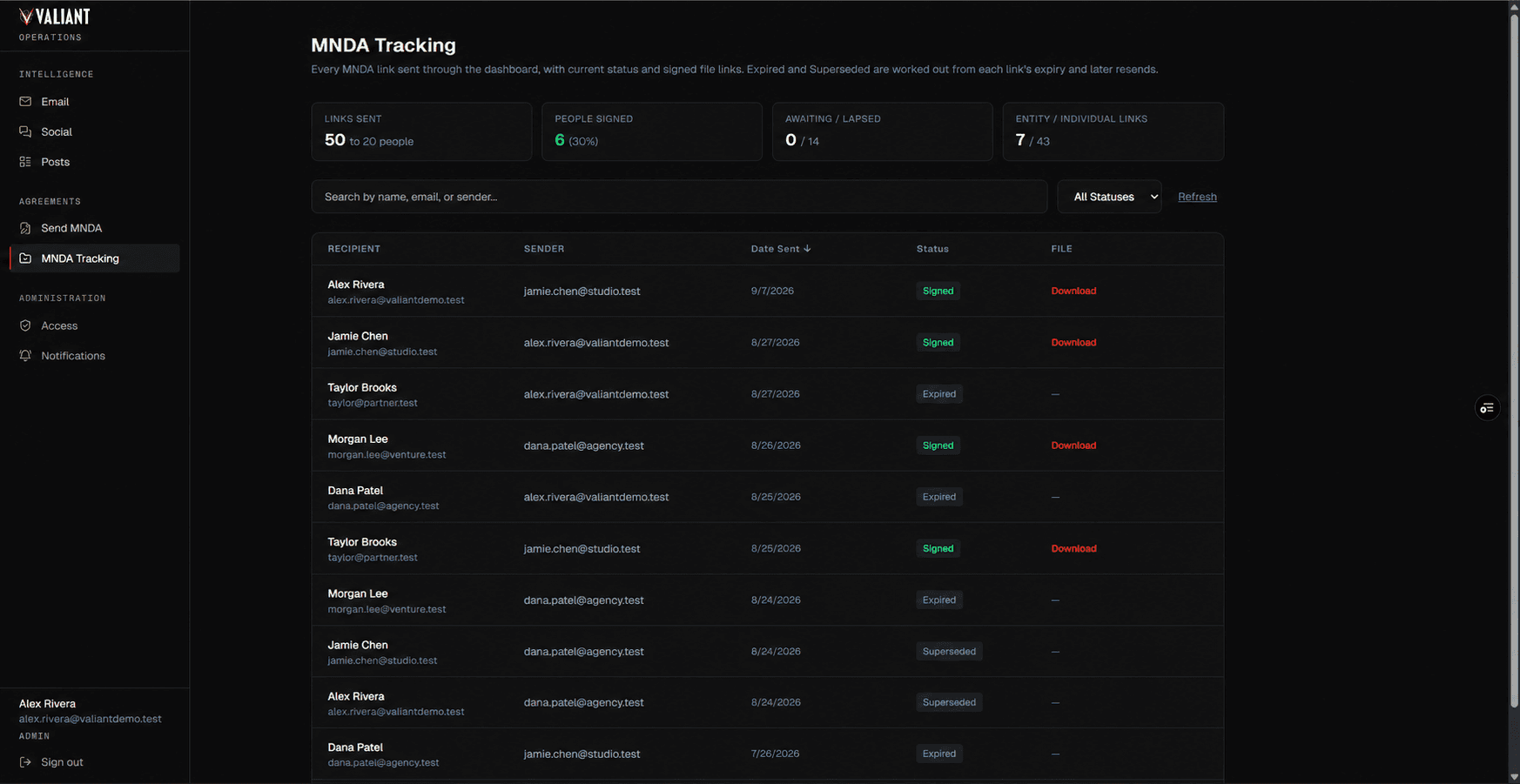
Access Management
Who can see it, and who hears about it
Admins review access requests, grant access directly, set each person's role, and revoke it. Signature notification recipients are managed in the same Administration section.
› People without access request it from the sign-in screen, which offers password or Google sign-in.
Real buildAdministration / AccessFull size ↗ 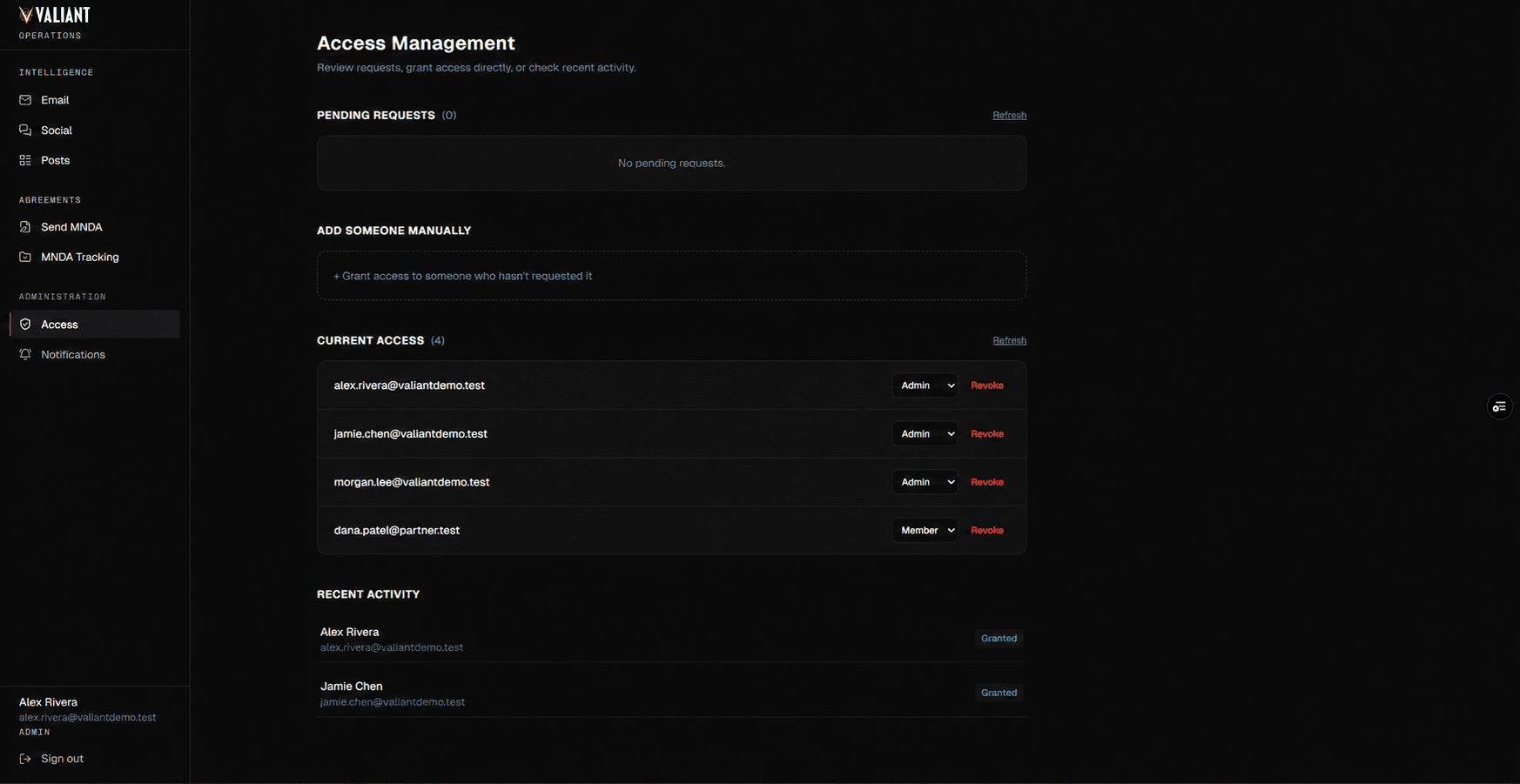
REAL BUILD: sanitized screenshots of the production system, prepared for this portfolio. Account names, email addresses, and agreement records shown are demo data.
Architecture
How it connects
Data in
- GoHighLevelEmail campaign performance, cached for up to an hour
- Google SheetsSocial mentions and post comments, sentiment-labelled by an upstream collection pipeline
The platform
- Next.jsThe application: intelligence views, the MNDA workflow, and administration
- VercelHosting and deployment
- Google OAuthSign-in, alongside password accounts
Out
- ResendTransactional email sent by the platform
After
What changed
Stack
For technical readers
Technical detail
Build notes
A Next.js application on Vercel that reads email campaign data from GoHighLevel and social and post data from Google Sheets.
Need an internal platform like this for your team?
› Get in Touch